9,683 identity-fraud reports and $643.7 million in reported fraud losses in 2024 tell you everything you need to know. Identity fraud in Canada has reached national-scale urgency, and an identity verification service is the control that closes the gap between who claims to apply and who shows up on day one.
If you're hiring in Canada, this isn't a nice-to-have layer on top of screening. It's the operational step that keeps résumé fraud, impersonation, and synthetic identities from slipping into your onboarding flow, while still giving your privacy officer a defensible paper trail.
Table of Contents
- What an Identity Verification Service Does and Why It Matters Now
- The Three Building Blocks of Modern Identity Verification
- Biometrics, KBA, and Document Checks in Practice
- Matching Verification Depth to the Canadian Criminal Check Levels
- Canadian Compliance Foundations Every Workflow Must Respect
- How to Choose an Identity Verification Service in Canada
- Building a Frictionless and Auditable Screening Workflow
- Action Steps and Common Questions for Canadian HR Teams
What an Identity Verification Service Does and Why It Matters Now
Canadian fraud isn't sitting still. The Canadian Anti-Fraud Centre recorded 9,683 identity-fraud reports in 2024, the highest volume of any fraud type that year, and broader fraud losses reached $643.7 million in reported losses in 2024. Statistics Canada also estimated that 2.5 million Canadians aged 15+, or 7.8%, experienced fraud in the prior 12 months, which tells you this is a consumer, employment, and financial onboarding problem, not a niche compliance issue (Canadian identity-fraud reporting and losses).
For HR, identity verification means one thing in practice, confirming the person who submits the application, references, and credentials is the same person who appears for work. That matters because impersonation doesn't just affect criminal record checks, it affects every downstream decision, from payroll setup to access badges to regulated onboarding.
Practical rule: if you can't explain why you collected a specific identity element, you probably collected too much.
The five decisions that matter
A good screening team isn't asking, “Should we verify identity?” Questions are sharper:
- Which checks should run for this role, and which ones are overkill.
- How deep to go when the role is sensitive, regulated, or public facing.
- What Canadian privacy law allows, including PIPEDA and provincial rules.
- Which vendor can prove control, not just promise speed.
- How to protect the candidate experience so people can complete the process on a phone without friction.
That's the right frame because the threat has changed. Synthetic identities, deepfake-assisted applications, and document fraud are now part of the hiring environment, so a basic document upload by itself is weak assurance. The rest of the job is matching the control to the risk, then documenting why you did it.
The Three Building Blocks of Modern Identity Verification
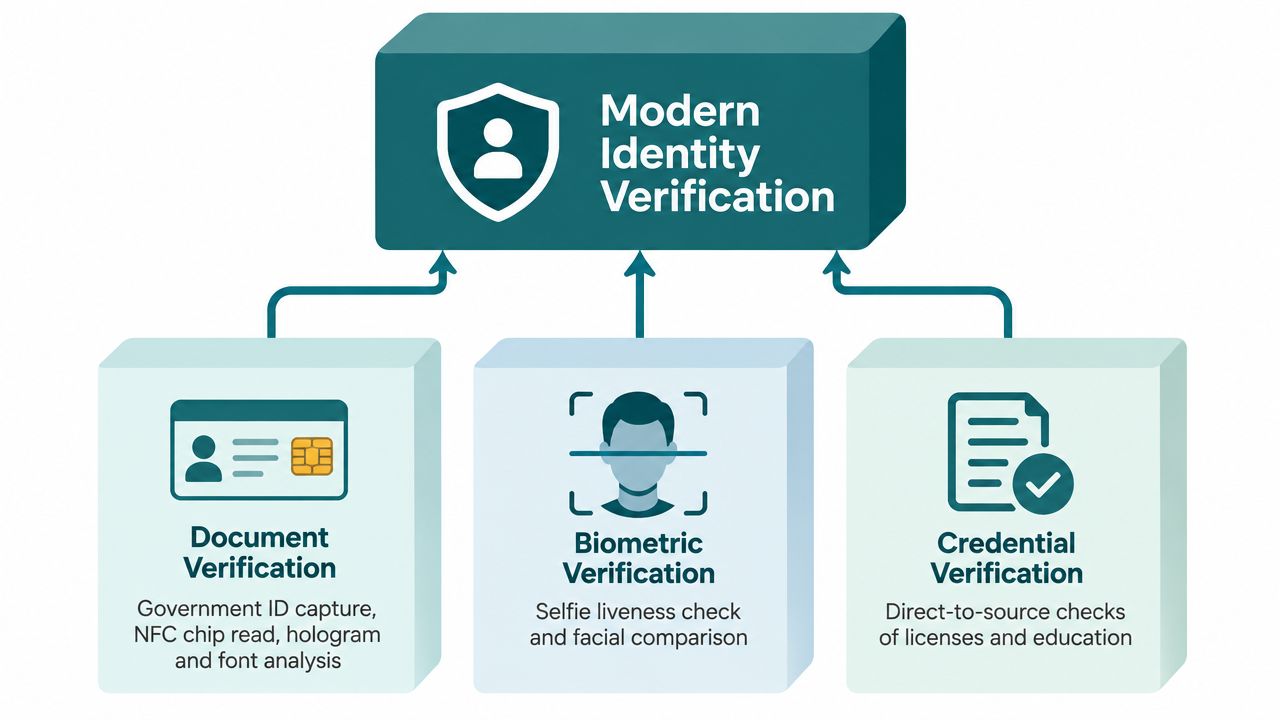
An effective identity verification service usually combines three layers. Each one catches a different fraud pattern, and the point of layering isn't sophistication for its own sake, it's to make impersonation harder without making every applicant jump through the same hoop.
Document verification
Document verification checks whether the government ID looks real and belongs to the person who submitted it. That can include photo capture, chip read where available, and visual integrity checks such as hologram and font analysis. In Canadian hiring, this is the first gate because it immediately tests whether the document itself is genuine enough to keep going.
Biometric verification
Biometric verification compares a live selfie to the ID photo and uses liveness checks to reduce spoofing. If someone submits a photo taken at a job fair or reuses a static image, the biometric step is where that fraud usually gets exposed. This is the layer that turns a document into a person.
Knowledge-based and database checks
Knowledge-based authentication and database checks test whether the applicant can tie themselves to stable records, such as out-of-wallet questions or approved data sources. In a Canadian context, the useful part is not the trivia, it's whether the information is consistent across sources that are defensible under privacy rules.
The best model is layered, not absolute. One control catches document fraud, another catches person fraud, and a third checks whether the identity footprint is consistent enough to trust.
Biometrics, KBA, and Document Checks in Practice
A hiring manager does not need a technical lecture. They need to know what each method catches, where it breaks, and which roles justify the extra friction. Start with the failure mode.
What breaks first
A document check fails when the ID image is substituted, cropped, or tampered with. A biometric flow fails when the selfie is spoofed, low quality, or lifted from a non-live image. A KBA or database check fails when the applicant's claimed history does not line up with available records, or when the data source is too thin to support a strong conclusion.
Good screening design does not ask every candidate to prove the same thing the same way. It asks the minimum question that still protects the role.
Match the method to the role
A frontline retail role, a warehouse role, and a controlled-access role do not deserve the same depth. The first may only need strong document and selfie verification. The second might justify an additional credential check if the role includes equipment or safety access. The third needs tighter identity proofing because the downstream consequences of a false identity are higher.
Biometric verification is the right phrase for the selfie match step, and it belongs in remote hiring or any workflow where impersonation is a real concern. Keep the explanation plain for managers. Document checks say, “This ID looks real.” Biometrics say, “This person matches the ID.” Database checks say, “This identity is consistent with other records.” That is the logic Alero Background & Identity uses in its Canadian screening workflows, including identity proofing and direct-to-source checks, with data residency kept within Canada.
| Identity Verification Methods in Practice | What It Catches | Common Failure Mode | Best-Fit Roles |
|---|---|---|---|
| Document Verification | Fake, altered, or substituted ID | A clear image of a bad document can still pass if the process stops too early | Most hiring workflows |
| Biometric Verification | Impersonation and reused images | Poor lighting, camera issues, or intentional spoofing | Remote hiring, higher-risk roles |
| Knowledge-Based and Database Checks | Identity inconsistency across records | Thin data or outdated records can reduce confidence | Roles needing extra assurance |
Use a vendor demo to see the checks in sequence, not in isolation. If a provider cannot show how each layer fails safely, keep looking.
Matching Verification Depth to the Canadian Criminal Check Levels
Canadian employers blur identity verification and background screening all the time. That creates privacy problems, and it can create human-rights problems too. Match the depth of identity proofing to the level of criminal check you are allowed to request, and be able to explain that choice to a privacy officer.
Basic CRC, Judicial Matters, and VSC are not interchangeable
The RCMP treats a vulnerable sector verification as something different from a basic criminal record check. It combines a criminal record check with a search for record suspensions or pardons for sexual offences listed in Schedule 2 of the Criminal Records Act, and the RCMP says these verifications were created in 2000 to protect children and vulnerable persons (RCMP vulnerable sector policy). Ontario's police record-check guidance sets out three separate categories, Criminal Records Checks, Criminal Record and Judicial Matters Checks, and Vulnerable Sector Checks, which is why “background check” is too vague for hiring decisions (Ontario screening categories).
That distinction matters because the RCMP says a name-and-date-of-birth criminal record check can produce a possible match, but it cannot positively confirm identity. Positive confirmation requires fingerprints (RCMP identification mechanics). HR teams still act as if a name match settles the question. It does not.
What to request and when
- Basic CRC: use it for most non-sensitive roles where you need a criminal record screen but do not need a broader vulnerability-based assessment.
- Judicial Matters Check: use it where the role involves trust over assets or access that justifies a wider screen, but do not pretend it predicts behaviour beyond its scope.
- Vulnerable Sector Check: reserve it for roles with sustained contact with children, the elderly, or persons with disabilities, and only when the role legally qualifies.
If you need a plain-language primer on the scope and use cases, link your team to Canadian criminal record checks and stop treating every police check as interchangeable.
Using a VSC for a role that does not qualify creates exposure under the Ontario Human Rights Code and equivalent provincial rules. If your privacy officer asks why you wanted fingerprints or a VSC, answer with a role-based reason, not a habit. A defensible workflow ties the identity check to the actual risk in the job.
| Canadian Criminal Check Levels and Matching Identity Assurance | Scope | Identity Verification Required | Typical Roles |
|---|---|---|---|
| Basic Criminal Record Check | Criminal history check tied to identity match | Positive ID, name and date of birth match | Most non-sensitive roles |
| Judicial Matters Check | Criminal matters plus judicial information | Strong identity match, role-based justification | Roles with trust over assets or elevated access |
| Vulnerable Sector Check | CRC plus pardons or record suspensions for certain sexual offences | Fingerprint-based identity confirmation | Roles with sustained contact with vulnerable persons |
Canadian Compliance Foundations Every Workflow Must Respect
Canadian privacy law doesn't reward over-collection. It rewards clear purpose, narrow collection, documented safeguards, and a process that an applicant can understand. If your workflow can't survive a consent review, it's too loose.
Four rules that hold up in an audit
First, get meaningful consent at the offer stage and name the specific checks and dataflows. That means the candidate should know what's being collected, why it's being collected, and who processes it. The federal privacy guidance is blunt on this point, organisations should authenticate only when necessary, limit collection to what's needed for the transaction, and avoid recording photo ID details when a visual comparison is enough (Office of the Privacy Commissioner guidance).
Second, apply minimum collection. Don't ask for full dates of birth, full identity numbers, or extra documents when a narrower identifier is sufficient for the check. That's not just cleaner, it reduces the blast radius if data is mishandled.
Third, enforce retention limits and document destruction. Your vendor should be able to tell you when records are deleted, where they're stored, and what happens to any temporary images or biometric templates.
Fourth, guarantee individual access. Candidates need to see what was collected, correct errors, and request a copy. If they can't do that, your process is too opaque to defend.
Where privacy risk gets ugly
Cross-border processing is the trap that catches busy teams. If a vendor stores biometrics outside Canada, or can't clearly show where images and templates live, the legal and procurement conversation gets much harder. Keep the workflow Canadian, keep the audit trail visible, and insist on a record of consent, access, retention, and deletion.
For teams that want a practical PIPEDA starting point, the screening controls in Alero's PIPEDA background check guidance map well to this standard.
How to Choose an Identity Verification Service in Canada
Pick vendors the way you'd pick a regulated service partner, not a demo toy. The market is full of polished interfaces that fall apart when you ask where the biometrics live, how consent is logged, or whether the candidate can finish on a phone without support.
Score the provider on what matters here
Start with accuracy. Ask how the service handles liveness, document authenticity, and synthetic identity detection. Then ask what happens when the system isn't sure. A strong provider should route edge cases into manual review instead of forcing a bad auto-decision.
Next, test candidate experience. If people can't complete the flow quickly on mobile, your completion rate will suffer, and hiring managers will blame screening when the problem is bad UX. Turnaround matters too, so ask for clear same-day and 48-hour options, plus a real explanation of what delays file completion.
Data residency is essential in Canada. Ask whether biometric templates and applicant data stay in Canada, and whether any subcontractors touch the file outside Canadian borders. Then check integrations with your ATS or HRIS, because friction usually shows up when data has to be re-keyed.
If the vendor can't explain its consent flow, retention clock, and access log in plain English, they're not ready for your privacy officer.
Alero Background & Identity is one option in this category. It offers Canadian background screening and identity verification with Canadian data residency, mobile-first intake, and integrations with common HRIS and ATS platforms.
| Vendor Evaluation Matrix for Canadian Identity Verification | What to Ask the Vendor | Acceptable Threshold | Red Flag |
|---|---|---|---|
| Verification Accuracy | How do you detect liveness and synthetic identities? | Clear explanation of layered checks and manual review | “Our AI handles it” with no detail |
| Candidate Experience | Can a candidate finish on mobile without support? | Simple mobile flow and low drop-off | Desktop-only or clumsy uploads |
| Turnaround | What are your standard file completion options? | Clear same-day or 48-hour path | No published operational expectation |
| Data Residency | Where are biometrics and PII stored? | Canadian storage and processing | Offshore storage or vague answers |
| Integrations | Do you connect with major HRIS and ATS tools? | Native or well-documented integration | Manual CSV workflows only |
| Pricing | What's included, and what's extra? | Transparent CAD pricing | Hidden per-feature add-ons |
| Compliance | Can you show consent and access workflows? | Documented PIPEDA and CPIC alignment | No audit-ready artefacts |
Ask for a pilot with twenty real candidates before you sign. A demo proves nothing. A pilot shows where the workflow breaks.
Building a Frictionless and Auditable Screening Workflow
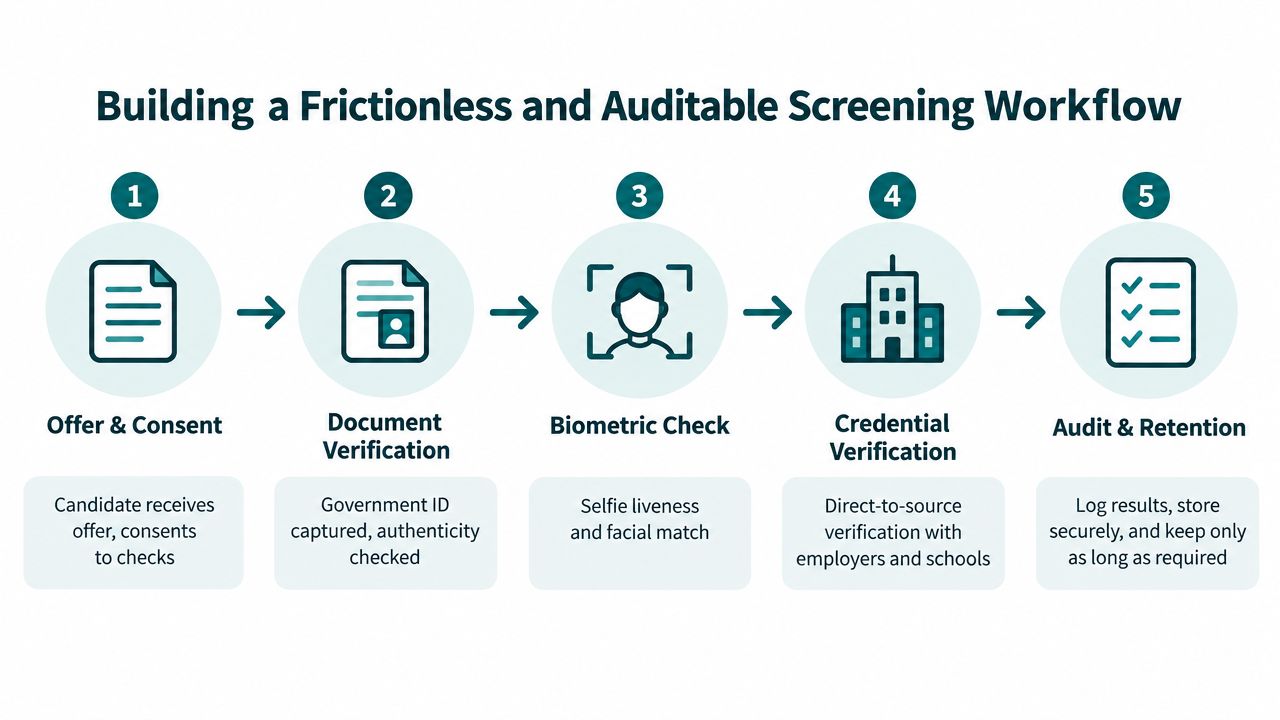
For most Canadian employers, the sensible default is layered document and biometric verification, plus direct-to-source credential verification where the role warrants it. That gives you a defensible balance of assurance, speed, and candidate usability without turning every requisition into a compliance project.
What the candidate should experience
The handoff should start with a clear SMS or email link. The candidate uploads a government ID, takes a selfie, completes the liveness check, and then the system extracts the needed data points. If the role requires it, the workflow can run parallel credential checks against the appropriate source, with exceptions routed to a human reviewer.
The recruiter dashboard should show more than a green check. It should show timestamped consent, the source of each data element, the retention clock, and who accessed the file. That's the audit trail your privacy officer wants, and it's the only way to defend a disputed decision later.
When human review should fire
Don't auto-decline everything that's messy. Set review triggers for low face match scores, expired documents, address mismatches, and conflicting records. A good workflow protects the recruiter from guessing and keeps the final call tied to documented rules.
Measure what matters, not what's easy to brag about:
- Median time-to-clear tells you whether the workflow is fast.
- Candidate completion rate on mobile tells you whether people can finish without a desktop.
- Auto-decision rate tells you how often the system can clear routine files without unnecessary manual work.
If your process is slow, opaque, or full of one-off exceptions, you don't have a screening system. You have a queue.
Action Steps and Common Questions for Canadian HR Teams
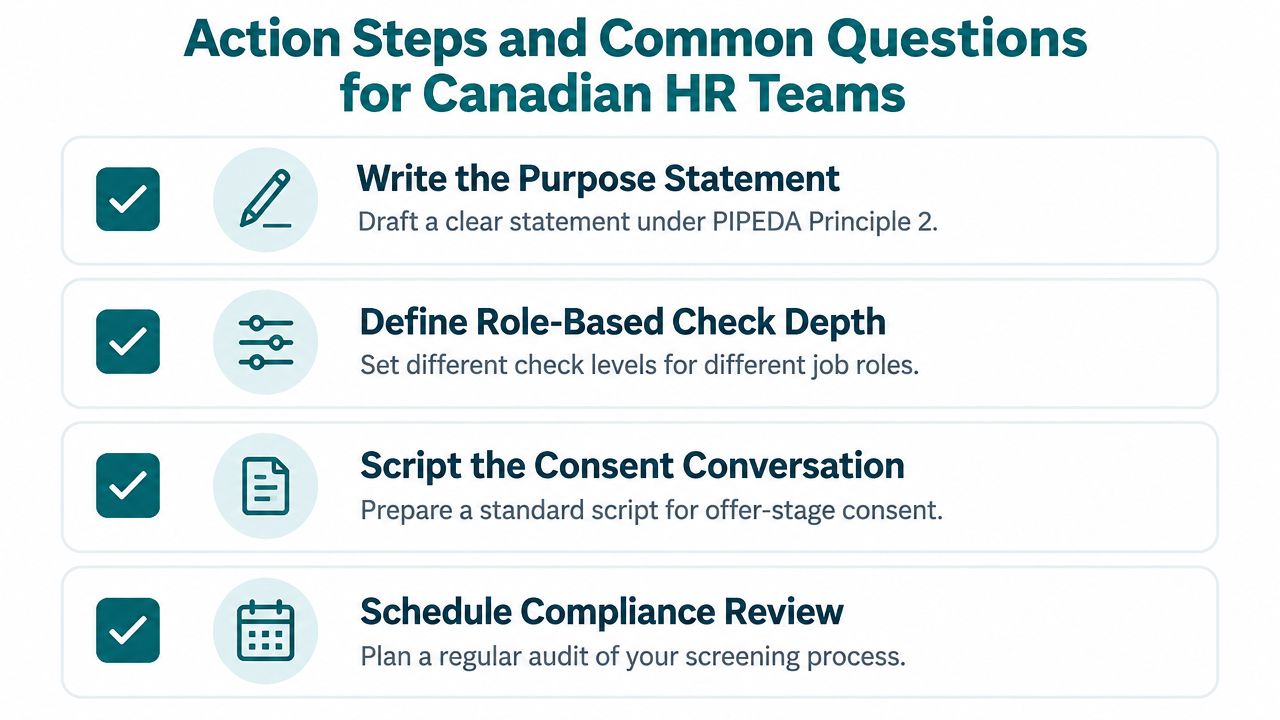
Write the purpose statement under PIPEDA Principle 2. Define role-based check depth, script the consent conversation, set retention at 12 months post-decision, name the access owners, and schedule a quarterly vendor review. That's the minimum policy spine a privacy officer can live with.
The questions HR asks most
How long does identity verification take? The ID step can take seconds, while the full file can take hours to days, depending on the checks and the exception rate.
Can a candidate refuse biometric capture? Yes, but you need to decide whether there's a reasonable alternative and whether the role can proceed without it. If biometrics are necessary, the offer should say so clearly.
What about newcomers or out-of-province candidates? Use the strongest available Canadian proofing path and avoid assuming a thin local history means a weak candidate. It usually means the record trail is shorter.
What do we disclose if a record changes the hiring decision? Disclose only what's necessary, keep the explanation role-based, and honour access and correction rights under privacy law.
If you want a Canadian screening partner that can handle identity verification, criminal checks, credential verification, and candidate workflows under one roof, talk to Alero Background & Identity. Build the process now, before the next requisition puts you in a rush and the privacy officer starts asking harder questions.